ouija — ~/your-project — 120×40 github · docs
ouija planchette

ouija

AI agents you write in Go — not prompt files.

You write each agent, called a totem, as Go code in your own repo, with types, tests and golden files. A shared engine gives every totem model providers, a sandbox, a cost budget, tracing and editor integration (MCP). A terminal chat shows every tool, every diff and every cent.

latest release MIT Go 1.26+ linux · macos · windows
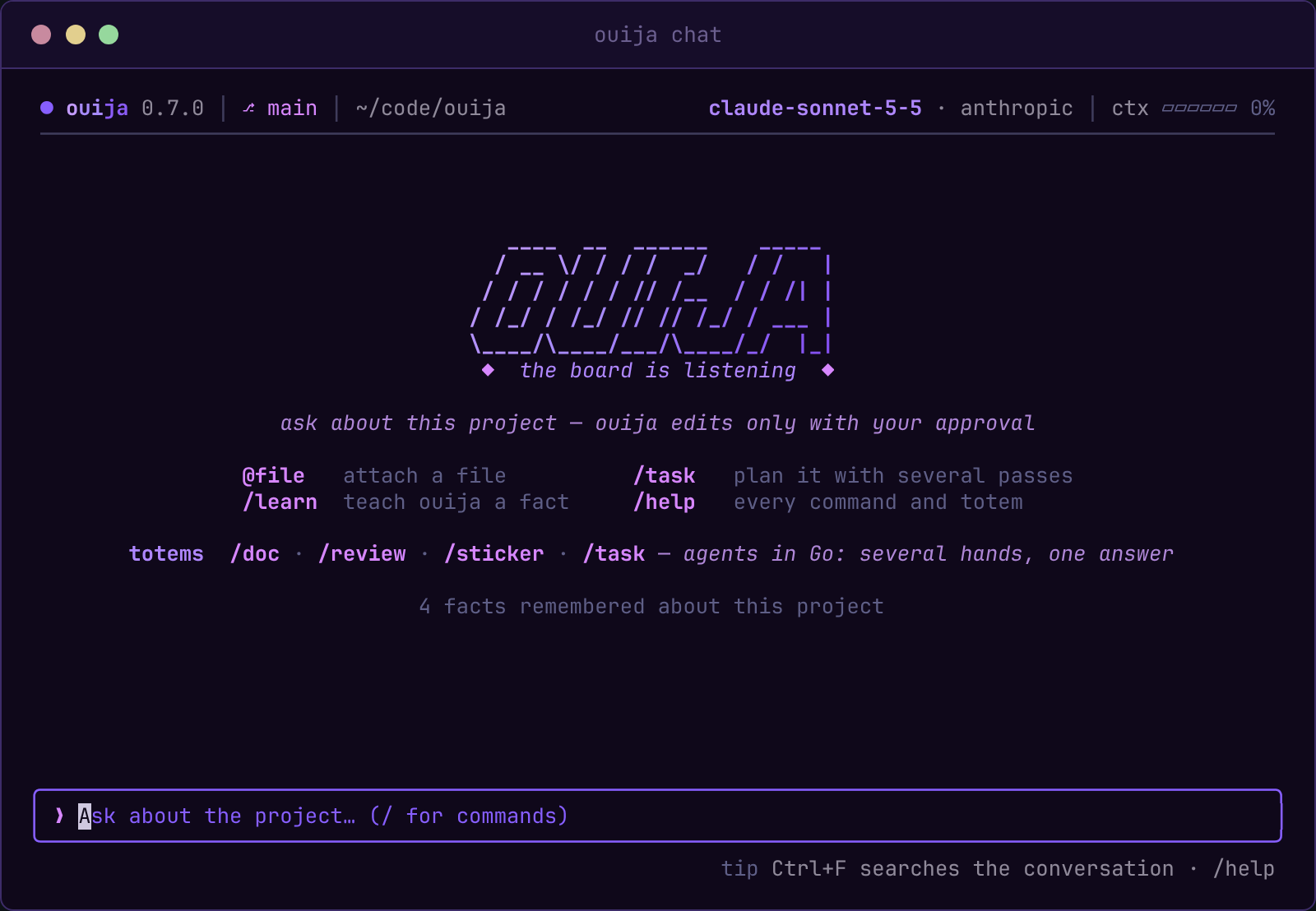
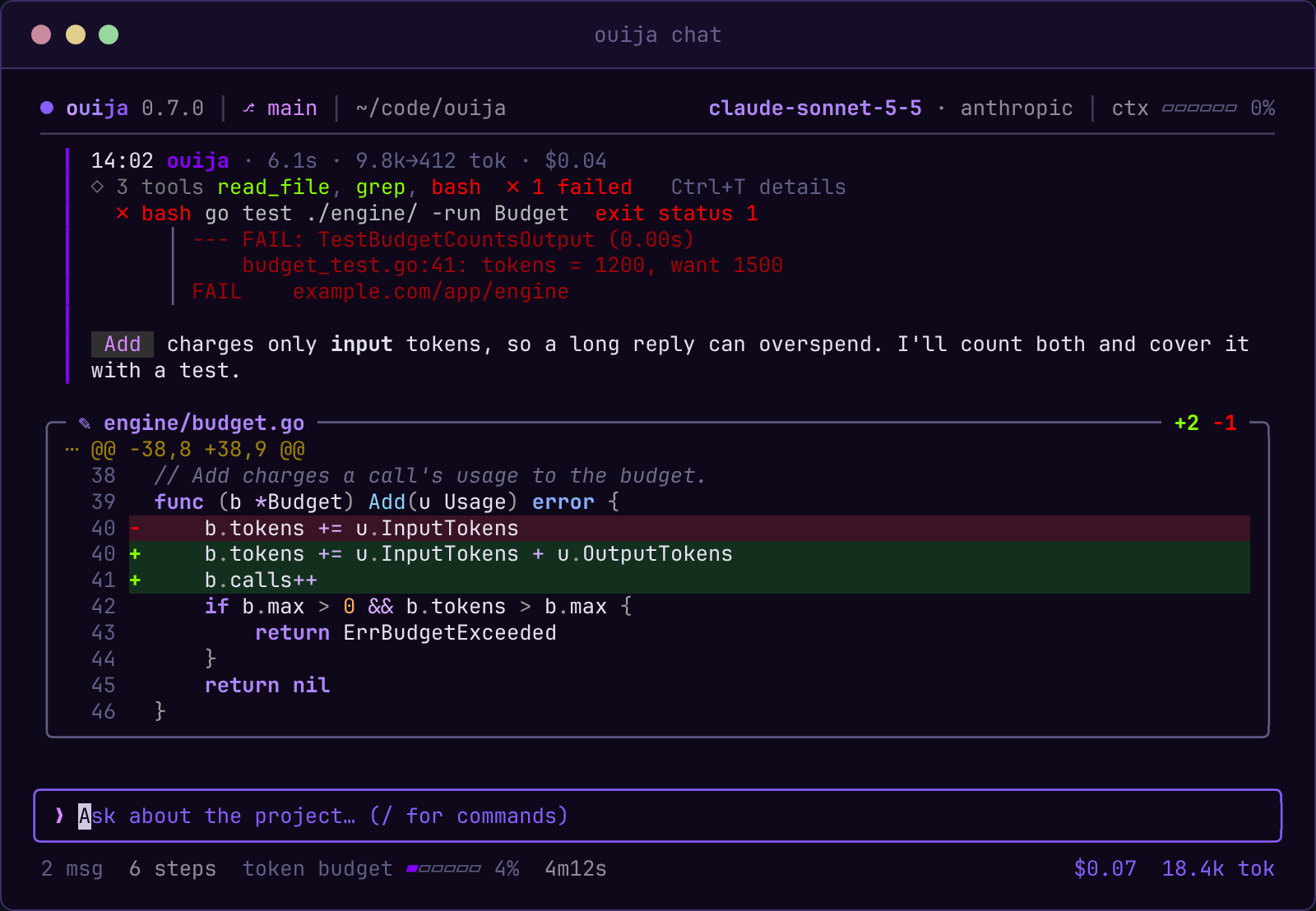
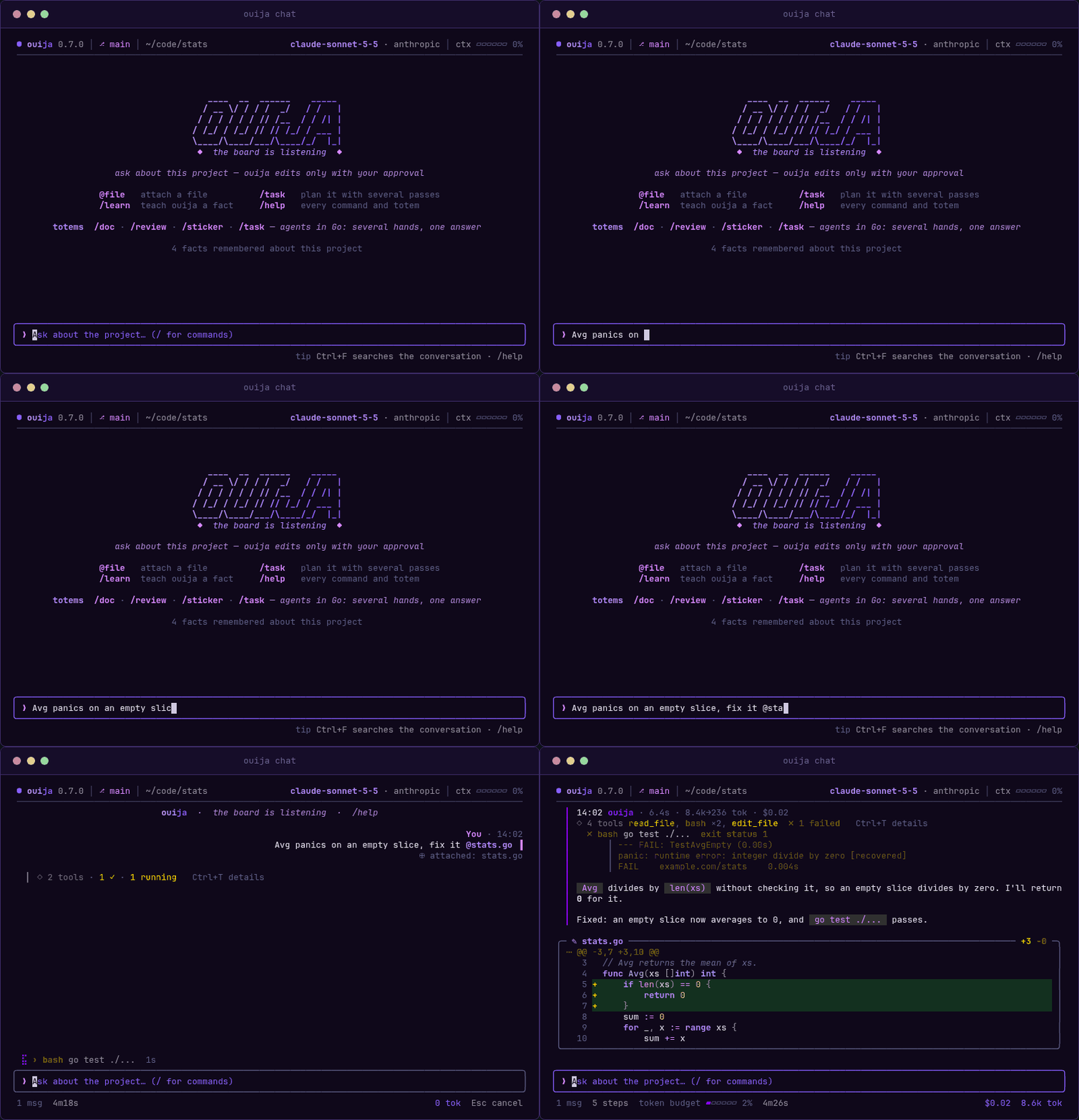
The ouija chat: a question about a failing test, the tools it runs, the fix shown as a diff and approved, and the test passing
~/ouija❯cat WHY.md

Write your workflow as code the model cannot skip

Write "do A, then check B, then merge the results" in a prompt, and the model may skip a step. Write it in Go, and each step is the next line of code: it always runs, and you can test it.

totems · go

Agents are Go types

A totem is an agent written as a Go type. It lives in your repo with unit tests and golden files, and go build turns it into a standalone binary.

sandbox · fail closed

When in doubt, it denies

A filesystem sandbox, an OS sandbox for bash (on by default on Linux and macOS), protected paths, permission levels and a bash allowlist limit what an agent can touch. The engine also stops an agent that repeats the same call in a loop and sanitizes the environment that commands see.

budget · $

Every cent on screen

Each run has a token and cost ceiling, and every reply shows its time, tokens and cost.

trace · json

Traced end to end

ouija records every model call and tool run in a trace you can read later: what was asked, what ran and what it cost.

chat · tui

Shows its work

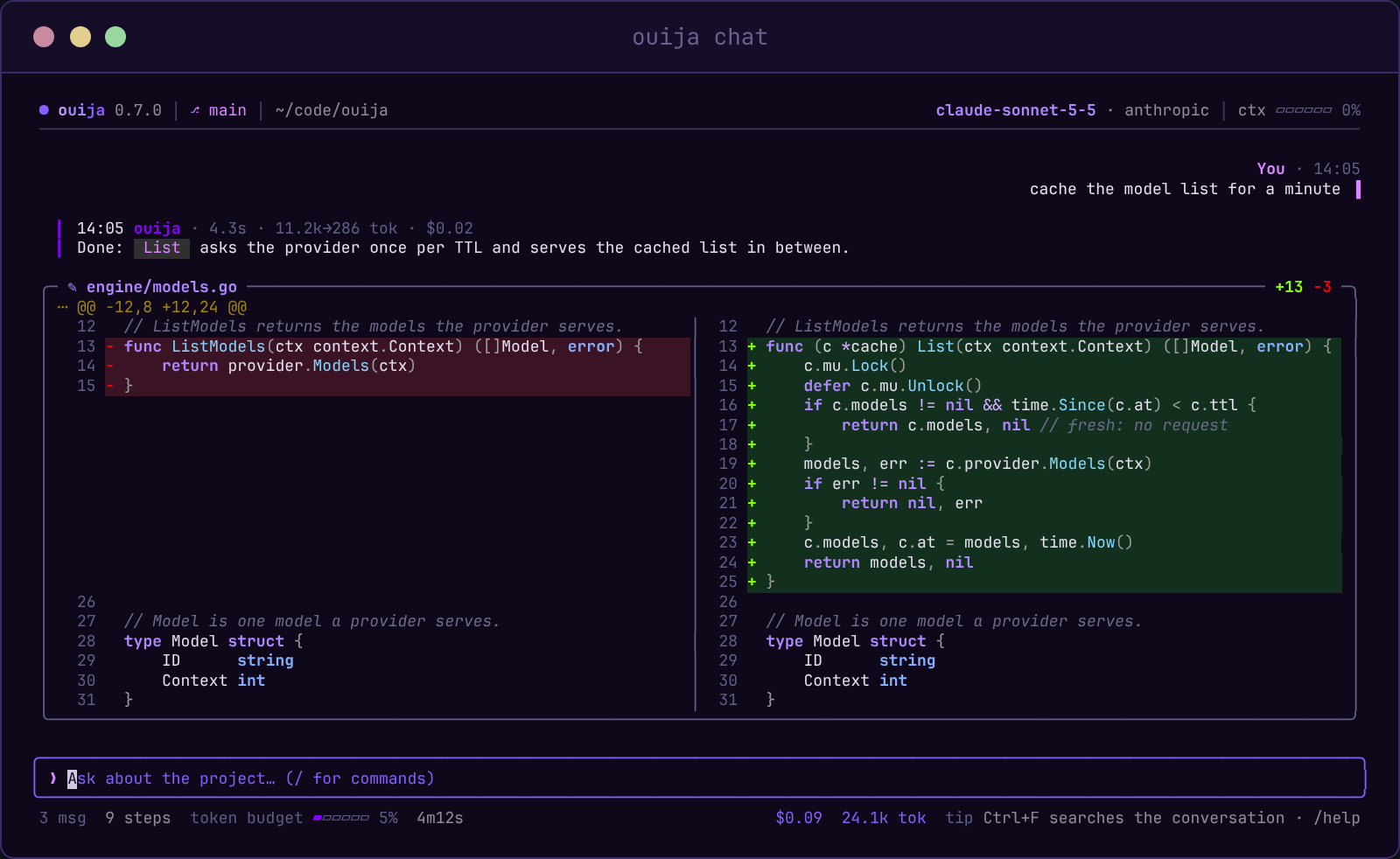
The chat shows each tool as it runs and each diff side by side, and asks before it writes a file. It also has /undo, @file, search, themes and resume.

mcp · editors

Plugs into your editor

MCP is the protocol editors use to call outside tools. ouija mcp install registers every totem as a tool in Claude Code, Cursor or OpenCode.

~/ouija❯diff AGENT.md totems/plan/plan.go

A prompt asks. A totem does.

The same three steps, written twice. On the left, the model decides whether to follow them. On the right, the steps are the program, so they always run.

AGENT.md · a request
## Planning
1. Read the relevant files first.
2. Write three independent plans.
3. Verify them, then reconcile.

IMPORTANT: never skip step 3!!
  • the model may still skip a step; "IMPORTANT" is only a hope
  • no code to unit-test or to review
  • cost and tool use are left to chance
plan.go · a program
// 1. read first
scout, err := eng.Run(ctx, scoutReq(args.Task))
if err != nil {
    return nil, err
}
// 2. three independent passes, in parallel
plans := make([]string, 3)
g, ctx := errgroup.WithContext(ctx)
for i := range plans {
    g.Go(func() error {
        res, err := eng.Run(ctx, passReq(scout.Text, i))
        if err == nil {
            plans[i] = res.Text
        }
        return err
    })
}
if err := g.Wait(); err != nil {
    return nil, err
}
// 3. the next line: it always runs
return reconcile(ctx, eng, plans)
  • step 3 is the next line, so it always runs
  • go test and golden files check the whole flow
  • budget, sandbox and trace come from the engine
~/ouija❯ouija task "add a cache"

Several hands spell one answer

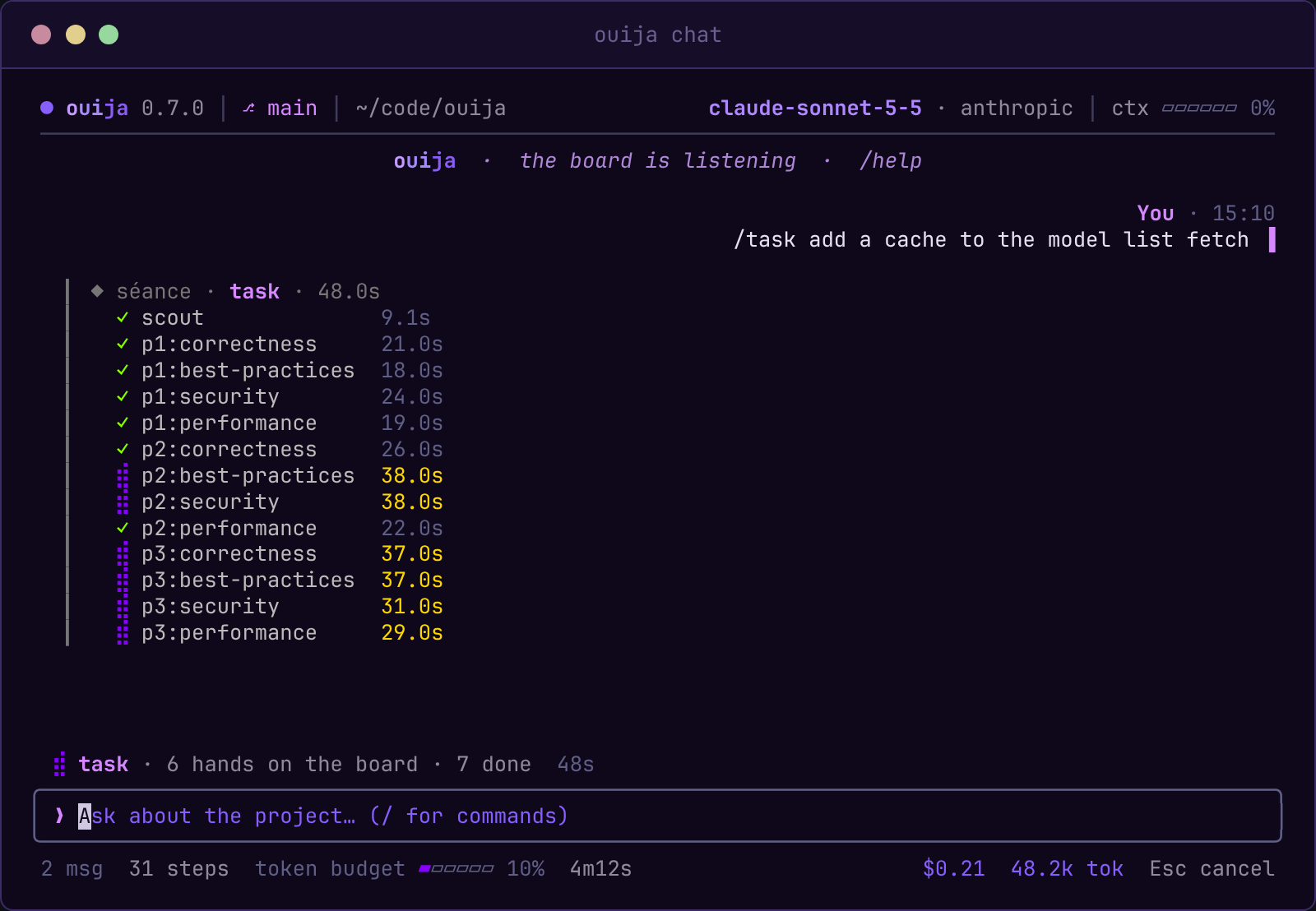
A ouija board needs several hands, and so does a good plan. The task totem first scouts the code, then asks the model for several independent plans, called passes, and finally reconciles them, keeping what they agree on.

01 scout

Reads the code the task touches and maps it.

→
02 passes · in parallel ⠋ pass 1░░░░░░░░░░░░░░ ⠋ pass 2░░░░░░░░░░░░░░ ⠋ pass N░░░░░░░░░░░░░░
→
03 reconcile

Merges the passes into one verified plan and a checklist.

the engine knows nothing about tasks or documents; each totem defines its own steps and shares the engine's budget, sandbox and tracing

~/your-project❯ouija

Every reply says what it did

Each reply lists its tools on one line, with the last output lines of any command that failed, followed by its time, tokens and cost. Every file change appears as a diff.

last turn
✓ read cache.go · ✓ grep "Client" · ✗ bash go test ./... · ✓ edit client.go +18 −4
12s · 8.4k tokens · $0.02 · /undo to take it back
@fileattach a file
/undotake a change back
Ctrl+Fsearch
-cresume last chat
~❯ouija setup

From zero to a séance in a minute

ouija is a terminal program: "installed" means ouija is on your PATH.

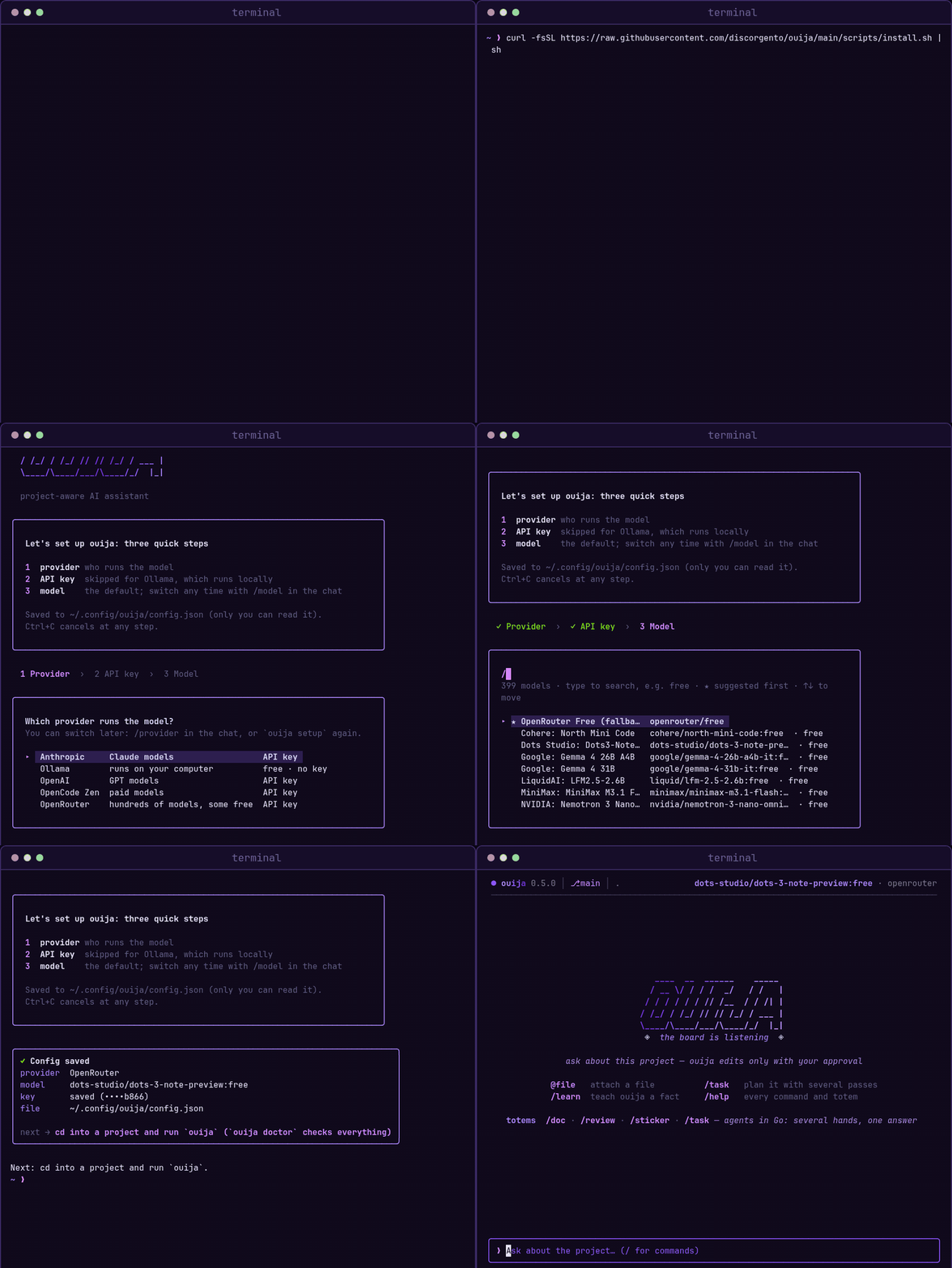
A real install: the curl command, the PATH and setup questions, the three setup steps with the model list searched for free models, then ouija opening the chat in a project
install
# PowerShell, no administrator rights needed
PS> irm https://raw.githubusercontent.com/discorgento/ouija/main/scripts/install.ps1 | iex

# then, in a new terminal
# it offers to open the setup
PS> ouija

installs to %LOCALAPPDATA%\Programs\ouija and adds it to PATH · the agent's bash tool needs Git for Windows

3 steps
  1. 1run the command for your platform
  2. 2answer two questions: add ouija to your PATH, and open the setup (provider, key, model)
  3. 3cd your-project && ouija and start chatting
  • pick ollama to run fully local and free
  • if something is wrong, ouija doctor tells you what
  • release archives ship with SHA256SUMS checksums and build provenance
anthropicopenaiopenrouteropencodeollama (local)
~/your-project❯history | head -7

Your first five minutes

From a fresh install to a verified plan for your own code.

history
0:00ouija setuppick a provider and a model — ollama runs local and free
0:40cd your-project && ouijathe chat opens on the welcome screen
1:00@internal/api/client.go why is this slow?it reads and searches the code, then answers, with the tools, time and cost on one line
2:30add a cache thereit proposes a diff and writes nothing until you approve it
3:30/undochanged your mind? it reverts the change
4:00/task "add a cache"independent passes agree on one verified plan
4:45ouija learn "we use sqlc"it saves the fact and uses it in later chats

every key and slash command: chat guide · getting started

~❯ouija --help
usage: ouija <command> [flags]
Talk
ouija · ouija chatinteractive terminal chat: tools, streaming, diffs, approvals
ouija chat -cresume the last conversation
Totems
ouija task "…"verified plan: scout → N passes → reconcile → checklist
ouija reviewreview the branch: find problems → a skeptic verifies each → what holds
ouija doc "…"client-facing document checked against the code — HTML + PDF + technical Markdown
ouija stickerlaptop sticker SVG from real project metrics
ouija generate totemscaffold a new totem
Project
ouija setup · ouija initglobal defaults · per-project config
ouija learn "fact"save project knowledge for the chat and the task totem
ouija trustapply a project config you did not write: permissions, tools, apiKey, provider/model, budget…
ouija mcp installregister ouija in Claude Code, Cursor or OpenCode
ouija doctorcheck the config, the provider key, the bash sandbox and which editors are connected

flags, slash commands, shortcuts and exit codes: CLI reference

~/your-agents❯ouija generate totem --external

Go decides the steps. The model only judges.

A code reviewer in about 50 lines. Go reads the diff, and the model looks for problems: System tells it how to work, Prompt gives it the data, and Schema fixes the shape of its answer. Then a second call, the skeptic, checks each finding, because the Go loop says so. The totem is a Go type in your own repo, so you need no fork, and it inherits the engine's budget, sandbox, tracing and MCP. Piece by piece →

code
package review

import (
    "context"
    "encoding/json"
    "os/exec"

    "github.com/discorgento/ouija/engine"
    "github.com/discorgento/ouija/registry"
    "github.com/discorgento/ouija/schema"
)

type Totem struct{}

func (t *Totem) Name() string    { return "review" }
func (t *Totem) Summary() string { return "Review the branch: find problems, verify each one" }

func (t *Totem) Run(ctx context.Context, eng *engine.Engine, args registry.Args) (any, error) {
    // 1. Go gathers the context — what changed since main. Nothing to guess.
    cmd := exec.CommandContext(ctx, "git", "diff", "--no-ext-diff", "--merge-base", "main")
    cmd.Dir = eng.Config().ProjectRoot
    diff, err := cmd.Output()
    if err != nil {
        return nil, err
    }

    // 2. The model judges. System: how to work. Prompt: this call's data.
    //    UseTools: it may open files. Schema: the shape the answer must have.
    found, err := eng.Run(ctx, engine.RunRequest{
        Label:    "find",
        System:   "You review code changes. Report real bugs only, never style.",
        Prompt:   "Focus: " + args.Task + "\n\nDIFF:\n" + string(diff),
        UseTools: true,
        Schema:   schema.Obj(map[string]any{"findings": schema.Arr("one problem each: file, line, why")}, "findings"),
    })
    if err != nil {
        return nil, err
    }
    var out struct{ Findings []string }
    if err := json.Unmarshal([]byte(found.Text), &out); err != nil {
        return nil, err
    }

    // 3. A rule in Go, not a request in a prompt: a skeptic checks every
    //    finding, and only the confirmed ones are kept.
    var confirmed []string
    for _, f := range out.Findings {
        v, err := eng.Run(ctx, engine.RunRequest{
            Label:    "verify",
            System:   "You are a skeptic. Read the code; say yes only if the problem is real.",
            Prompt:   f,
            UseTools: true,
            Schema:   schema.Obj(map[string]any{"real": schema.Enum("is it real", "yes", "no")}, "real"),
        })
        var verdict struct{ Real string }
        if err == nil && json.Unmarshal([]byte(v.Text), &verdict) == nil && verdict.Real == "yes" {
            confirmed = append(confirmed, f)
        }
    }
    return map[string]any{"confirmed": confirmed}, nil
}

func init() { registry.Register(&Totem{}) }
build & run
$ go build -o my-totem ./cmd/my-totem
$ my-totem review "concurrency"
$ my-totem mcp   # tools in your editor
inherited for free
  • 5 providers and their keys
  • cost budget and token ceilings
  • sandbox and permission levels
  • tracing of every call
  • CLI, typed inputs and MCP server

add a totem · why totems

the board

Ask the board.

Install ouija, run it in a project and watch it spell out the answer, with every tool, diff and cent on screen.

GOOD BYE